How to see the money you've collected, what fee you pay and how to refund a payment
Card payments go into your Stripe account, so everything that happens after a payment (whether the client paid, when the money arrives, the fee, the refund) is seen and done in Stripe, not in the admin panel. You need your Stripe account open, on the Stripe website or in the Stripe app on your phone.
What your client sees when paying
- The client scans the QR code or opens the link you sent.
- They land on the Stripe payment page. They see each line, with the name, quantity and price, plus the total, in the currency you chose. After paying, they see a page that tells them, in their language, whether the payment went through or was canceled.
- They pay once: it isn't a subscription. The payment code stays active, though, and can be paid again until you delete it (see below).
- After paying, they see "Payment complete. Thank you!" and a link back to the website. If they give up, they see "The payment didn't go through. Nothing was taken from the card."
How to find out whether they paid
- Open your Stripe account (the website or the app) and go to the list of payments.
- Look for the payment by amount and by date.
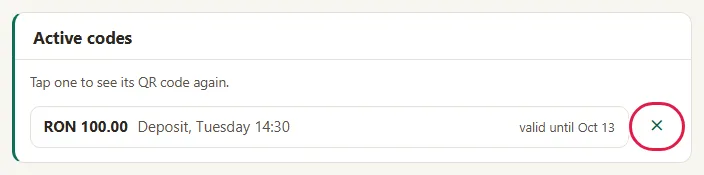
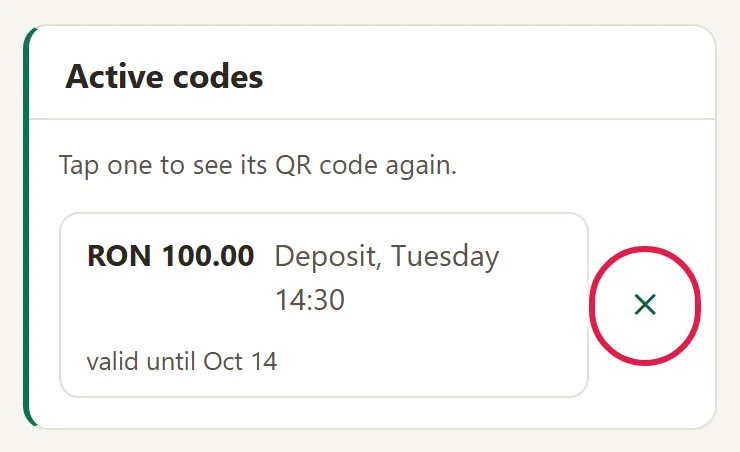
- Once you've seen that the payment went through, delete the code in the admin panel: in "My Clients › Payments", under Active codes, click ✕. Otherwise the code can be paid again. You only delete the code in the admin panel; the payment in Stripe stays.
When the money reaches your bank
Stripe sends the money to the bank account you gave when you signed up with Stripe, on its own payout schedule: the first transfer usually comes 7–14 days after the first payment, then within a few business days. We never touch the money: the payment goes straight into your Stripe account.
What fee you pay
- You only pay the Stripe fee, taken from each payment: 1.5% + 1 leu for a standard card issued in Europe, 2.8% + 1 leu for a premium one, more for cards from outside Europe (the prices published by Stripe, checked on November 4, 2026). You see it in the details of each payment, in Stripe.
- We don't take anything from the payment. Card payments come free with Maintenance.
How to refund a payment
- In Stripe, open that payment.
- Choose the refund, for the whole amount or just part of it.
- If the payment code is still under Active codes, delete it in the admin panel with ✕, so it can't be paid one more time.
What to do about invoices and accounting
- Card payments don't issue an invoice or a fiscal receipt: you issue them, from your own invoicing software (and in RO e-Factura, Romania's national e-invoicing system). The Stripe receipt, if the client gets one by email, doesn't replace an invoice.
- You get the statements and reports of what you've collected from Stripe. The admin panel has no report of your revenue.
Common problems
- "The client says they paid, but I don't see anything in the admin panel." The admin panel doesn't see payments. Look in Stripe.
- "The client came back to the website and doesn't know whether they paid." After paying, they see a page that tells them whether the payment went through or was canceled. If they're still not sure, confirm it for them yourself, once you see the payment in Stripe.
- "I received less than the amount." Usually, the difference is the Stripe fee, kept from the payment. In the payment details, in Stripe, compare the amount paid, the fee and what's left.
- "I can't find in Stripe what this guide describes." Stripe's screens change from time to time. Write to us at contact@webid.ro and we'll tell you where to find what you're looking for.
What it doesn't do
- It doesn't show you in the admin panel the payments you've received, who hasn't paid or how much you've collected per day or per month.
- It doesn't do refunds, cancellations or partial payments from the admin panel.
- It doesn't issue an invoice or a receipt.
- It doesn't mark the code as "paid" and doesn't close it by itself after payment: you delete it.
- It doesn't change Stripe's rates and doesn't negotiate the fee.
What data it uses
Payments, card details, the client's email and receipts are kept only in your Stripe account. Our admin panel doesn't see them and doesn't keep a record of payments, and you also do refunds in Stripe. For this data, you are the controller, and Stripe processes it under your contract with Stripe (Stripe privacy notice); what concerns us is in the DPA.