What maintenance does for you and when you need it
Maintenance is the subscription through which we keep your website up to date and keep an eye on it. The website on its own doesn't require it; only subscription add-ons do, and then the cart adds it as a separate line. Here you'll find out what you get, when it's required and what happens without it.
What you get with maintenance
- Platform updates, done by us. A regular update doesn't touch your texts and settings.
- Small fixes and minor changes, requested by email. We usually reply within two business days.
- Website monitoring, every 5 minutes, day and night. We check that the home page responds and that it really is your website, plus the security certificate (the one that puts the padlock next to the address). If something isn't working, we write to you.
- Diacritics added in one click to the texts you write without them.
- Photo descriptions, added on their own. Every photo you upload, anywhere on your website - on pages, in the Blog and in Resources -, gets an alt text, in each of your website's languages: a sentence about what's in it, read by Google and by people who can't see the image.
- With hosting by us: hosting, backups, publishing your changes and work on the website without asking for your passwords. If you pay yearly, the .ro or .eu domain is free, renewals included, as long as you pay yearly. If hosting with us stops, the domain stays yours, and the renewals pass to you.
- With Multilingual website: at every update, we also republish the versions of your website in the other languages.
You'll find the price on Pricing.
When you need maintenance
- The website on its own doesn't require maintenance. Neither do add-ons paid once, for example Multilingual website or SEO - setup.
- A subscription add-on (for example Bookings, Visibility, Social media or Blogging Plus) requires maintenance for at least the term paid for it. The cart adds it by itself, with the note "added automatically". Click Why?, next to the line, to see the reason.
- If your subscriptions expire on different dates, "My Account" shows you the "One date for everything" block, with the Align all to button followed by a date. You pay the difference in the cart, and maintenance then lasts as long as the subscription with the latest date.
How to add diacritics to a text
We deliver your website with diacritics already in place. The tool is for texts you write or correct later without them, for example from a phone without a Romanian keyboard.
- In the admin panel, type the text in the field, without diacritics.
- Click the ăîș button next to the field.
- The text gets its diacritics. Read it through once, then save, as usual.
The button only appears if you have maintenance active, and only for texts in Romanian.
What the tool does:
- It only adds diacritics. The words, the punctuation and the rest of the text stay exactly as you wrote them.
- It adds diacritics to at most 30,000 words a month for each website (several times your whole website) and to at most 5,000 words at once, at no extra cost.
- Over the limit, it shows you a message. Nothing is charged.
How photos get their description
When you upload a photo anywhere on your website, it gets an alt text on its own: a sentence about what's in it, in each of your website's languages. You can change it from the admin panel, like any other text. When maintenance starts, the photos you already have without one also get it, once.
- The description says what can be seen, without identifying the people in the photo: no names, ages or anything about their health.
- At most 200 new photos a month for each website, at no extra cost. Above that, you write the description yourself, from the admin panel.
- Photos you upload yourself in articles and in Resources get it the same way. Photos generated by AI in Blogging Plus articles get their description together with the article.
Where you see maintenance in the admin panel
Only the owner and colleagues with the Administrator role see the subscription part.
- Open Account & Settings, then My Account.
- Under What you have now you'll find the Maintenance line, with the option (with or without hosting by us), the price and "renews on" followed by the date.
- Below the line, under Term from the next renewal, you choose the next term. The steps are in How to change your term or cancel a subscription.
How to know your website is being monitored
- In the admin panel, open Today.
- On the "Your site" card you see "we check it every 5 minutes · available N% of the time over the last 30 days". The figure updates once a day.
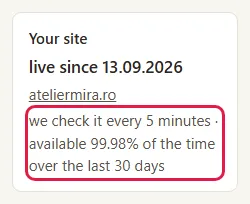
The line only appears with maintenance active and after your website is delivered.
What emails you get if your website goes down
If your website is hosted elsewhere:
- After about 10 minutes of not responding, you get "The website <domain> is not responding", with what we saw and what's worth checking (the hosting, the domain).
- When it works again, you get "The website <domain> is back up".
- If the page put up by the domain company appears instead of your website (usually when the domain has expired), you get "The domain … looks expired".
- When the security certificate has less than 14 days left, you get "The security certificate for … expires on …" once a week.
If your website is hosted by us, after about 15 minutes we write to you that we know and are working on it, then that it's back up. For an outage longer than 15 minutes, we also write to you about what happened.
How to ask for a fix
- Write to us at contact@webid.ro or reply to any email from us.
- Tell us what you want changed and on which page.
- We usually reply within two business days. If it's a major change, we tell you the cost before we start.
Common problems
- "Why did the cart add Maintenance?" You have a subscription add-on in the cart, and it requires maintenance for the same term. Click Why? next to the line.
- "I got 'The website … is not responding', but it works for me." The outage lasted more than 10 minutes and the website recovered, or the problem only shows up from certain networks. Wait for the "is back up" email. If it happens again, ask your hosting company: they can see what happened on the server.
- "I don't see the monitoring line in Today." You don't have maintenance active or your website isn't delivered yet. That's normal.
- "I don't see the ăîș button." The button only appears with maintenance active and only for texts in Romanian: it doesn't appear for English or another language.
- "The ăîș button tells me I've gone over the limit." You've used the month's 30,000 words or asked for more than 5,000 words at once. If you asked for too much at once, add the diacritics in smaller pieces. If you've used up the month's words, wait until the 1st of next month, when the limit resets. You don't pay anything.
- "Where do I ask for a fix?" By email, at contact@webid.ro.
What it doesn't do
- We don't promise a fix time. If your website is on your own hosting, getting it back up is up to the hosting company; we tell you what we saw.
- It doesn't include new work or major changes: you pay for them separately, and you learn the cost beforehand.
- The diacritics tool doesn't correct spelling or grammar mistakes: it only adds diacritics.
- If your website is hosted by us, you don't get the certificate warning: we renew the certificate ourselves.
- Without maintenance, a website hosted elsewhere doesn't break and doesn't lose its basic optimization. But it's no longer monitored, you no longer get updates and fixes, you no longer have the diacritics button or the automatic description for new photos, and subscription add-ons can't stay on.
- With hosting by us, maintenance includes the hosting: if you stop it, we no longer keep your website online with us and we hand it over to you. See How to change your term or cancel a subscription.
What data it uses
Monitoring reads only your website's public page and its certificate, with no personal data, and we keep the history of the checks for 90 days. When you click the diacritics button, the selected text goes to an AI provider only to get the diacritics back; we don't keep it, we only keep the number of words used in the month. Likewise, every new photo you upload to your website goes to the AI provider only to get its description, with the rule not to identify the people in it; the description stays with the photo and you can change it, and otherwise we only keep the number of photos in the month. Alerts go to the address from your order, and we keep help requests sent by email according to the Privacy Notice §3.e. If we host your website, we work on it with our own access, without asking for your passwords (T&C §9). The providers are listed in DPA §12.