Need more articles, or a break? What to choose in Blogging Plus without losing your credits
You don't need the same number of articles every month. A guesthouse writes more before summer, a pastry shop before the holidays, and sometimes you just want to stop for a while. Blogging Plus can fit each of these situations, without losing the credits you have. How to write and approve an article is in How to write blog posts with AI; here you find out what to choose when you need more or less.
What you get every month
- Your subscription's credits: 4, 8 or 16 a month, that is 2, 4 or 8 new articles, if you don't use them on anything else. A new article costs 2 credits; a refresh or an extra revision costs 1 credit each. Translating into another language doesn't use credits: it's done with Page translation.
- Topic ideas, without credits: at most 8 requests a month, one at a time.
- Unused credits stay valid in the month you receive them and the following two. The oldest are used first, so a quieter month isn't lost: its credits help you the next month.
When you need more in a single month: extra credits
Have an urgent topic and no credits left? Get 2 extra credits for €15, valid in the month you buy them and the following two. You can only get them while your subscription is active.
- In Blog, start the article (or a refresh or an extra revision), as usual. If you don't have enough credits, the "Not enough credits" window opens.
- The window tells you what it costs: 2 credits = €15.
- Click Add to Cart. On the payment page, you choose how many packs of 2 credits to get and see the total before you pay.
- After you pay, the credits appear in Blog and you can start the article.
The price doesn't include VAT. Do you get two extra credit packs a month on Small, or three on Medium? Then the next tier up costs you less and gives you at least as many credits: see the next section.
When you need more for a while: switch to a bigger subscription
Right for a busy season or a campaign of a few months. Only the website's owner or a colleague with the Administrator role sees the subscription part.
- In the admin panel, open Account & Settings › My Account.
- In What you have now, under Blogging Plus, click Switch to a Bigger Subscription.
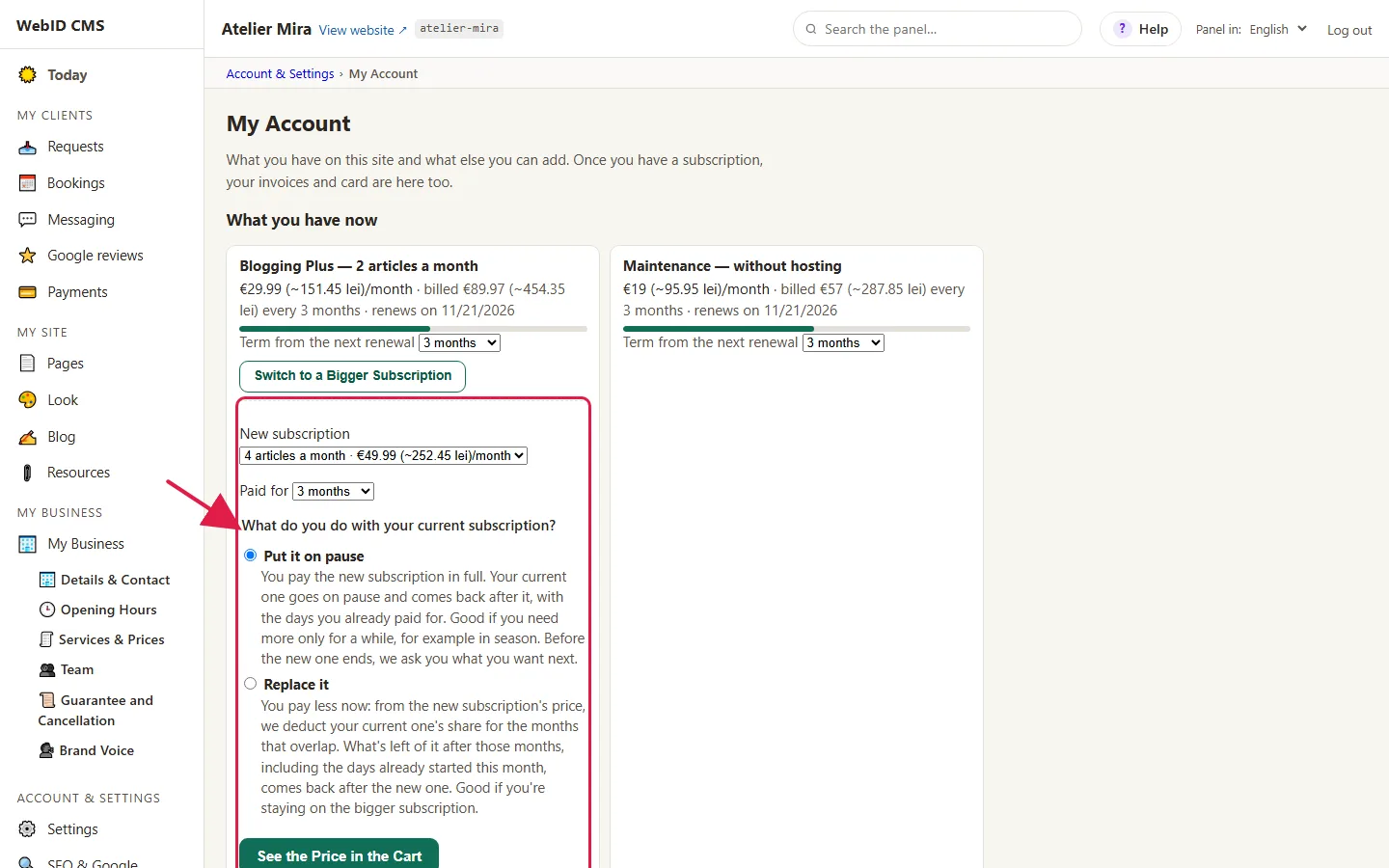
- Choose the New subscription and the period (Paid for).
- At "What do you do with your current subscription?" choose one of the options:
- Put it on pause: you pay the full new subscription. Your current one stays on pause and comes back after it, with the days you've already paid for. Right if you only need more for a while.
- Replace it: you pay less now, because we deduct from the new subscription's price your current one's share for the months that overlap. What's left of it after those months comes back after the new one. Right if you're staying on the bigger subscription.
- Click See the Price in the Cart. Under the new subscription's line, you see what happens to your current one and, if you replace it, the amount deducted. If you have Maintenance, the cart also shows the line "Maintenance - N more days, until <date>": maintenance has to last as long as your subscriptions, so we extend it until your current one comes back. You pay, and the new subscription starts right away.
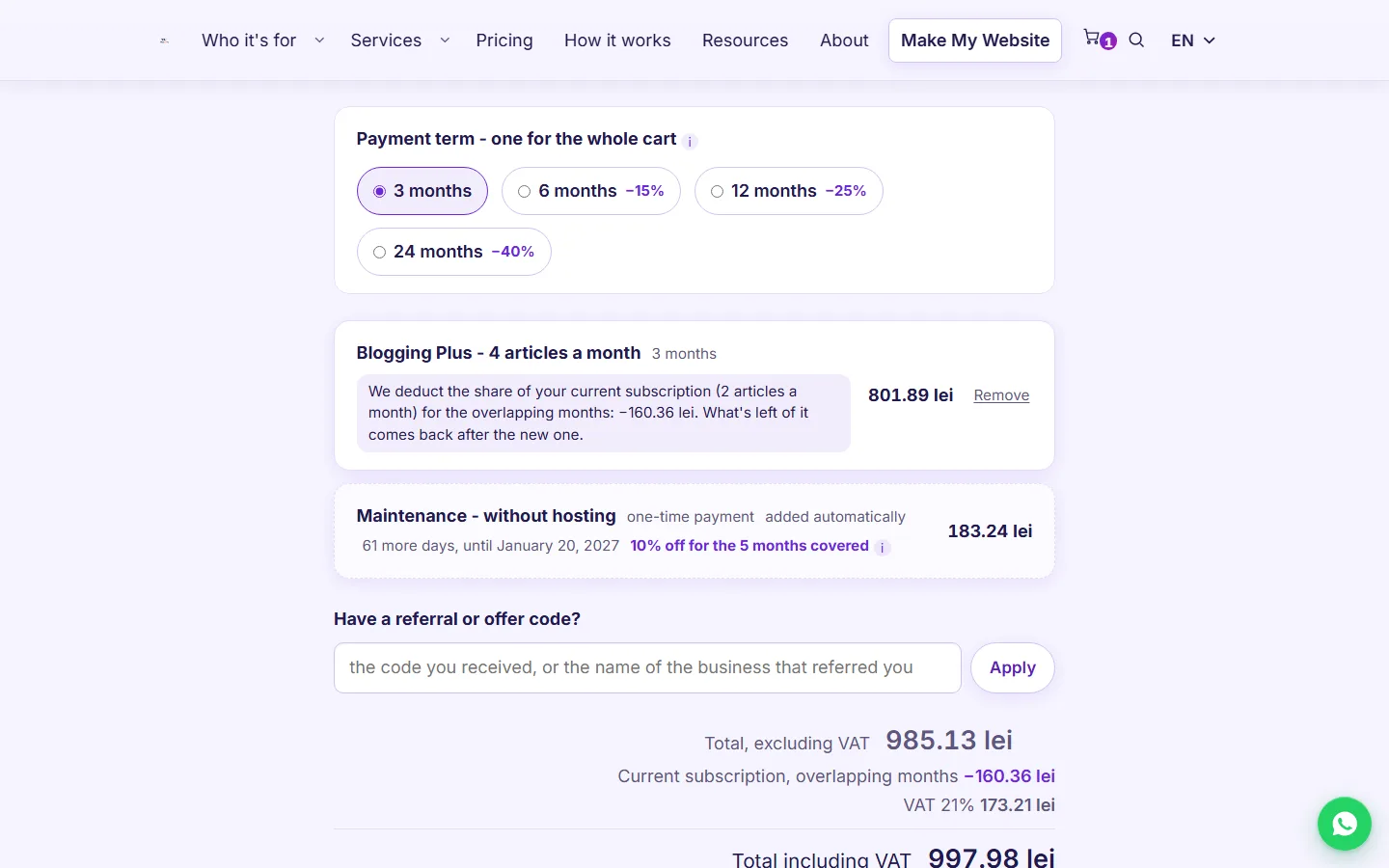
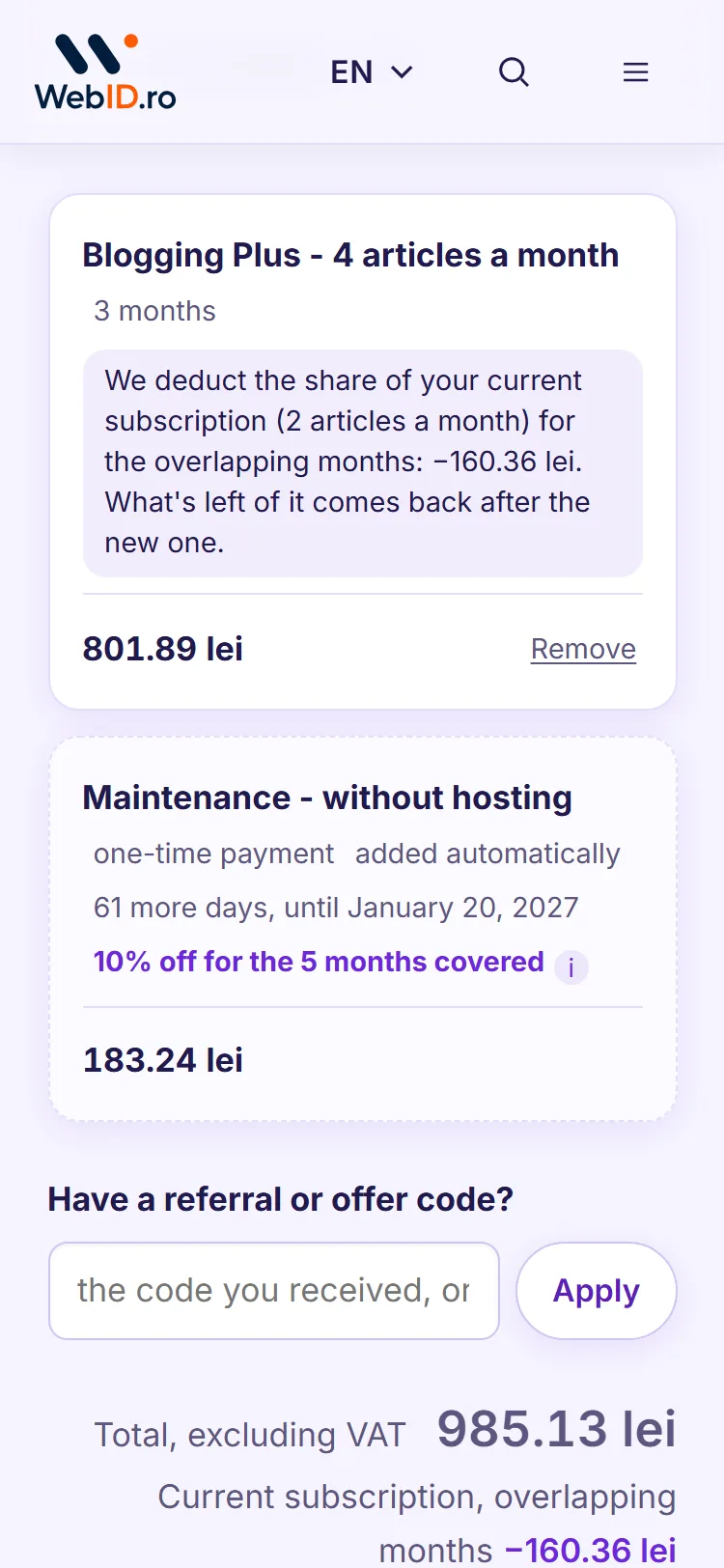
While it's on pause, the old subscription doesn't give you credits: you get the new subscription's credits. The credits you already had stay, each until its own expiry date.
What happens at the end of the bigger subscription
If you chose Put it on pause, or Replace it and something is left of your current one, the bigger subscription doesn't renew on its own. In My Account, you see the question "What happens on [date]?" from the start, with four choices. If you haven't chosen anything 7 days before the end, we also email you.
- Go back to my previous subscription: the big one stops, and your previous one comes back with its days, with no payment. This also happens if you don't choose anything.
- Keep this subscription for another period, paid in full: your previous one stays on pause, with all its days.
- Keep this subscription for another period, for less: we deduct the same number of months of your previous one from the price; what's left of it stays on pause.
- Stay only on this subscription, for 12 months: we deduct everything that was left of your previous one from the price, and you stay with just one.
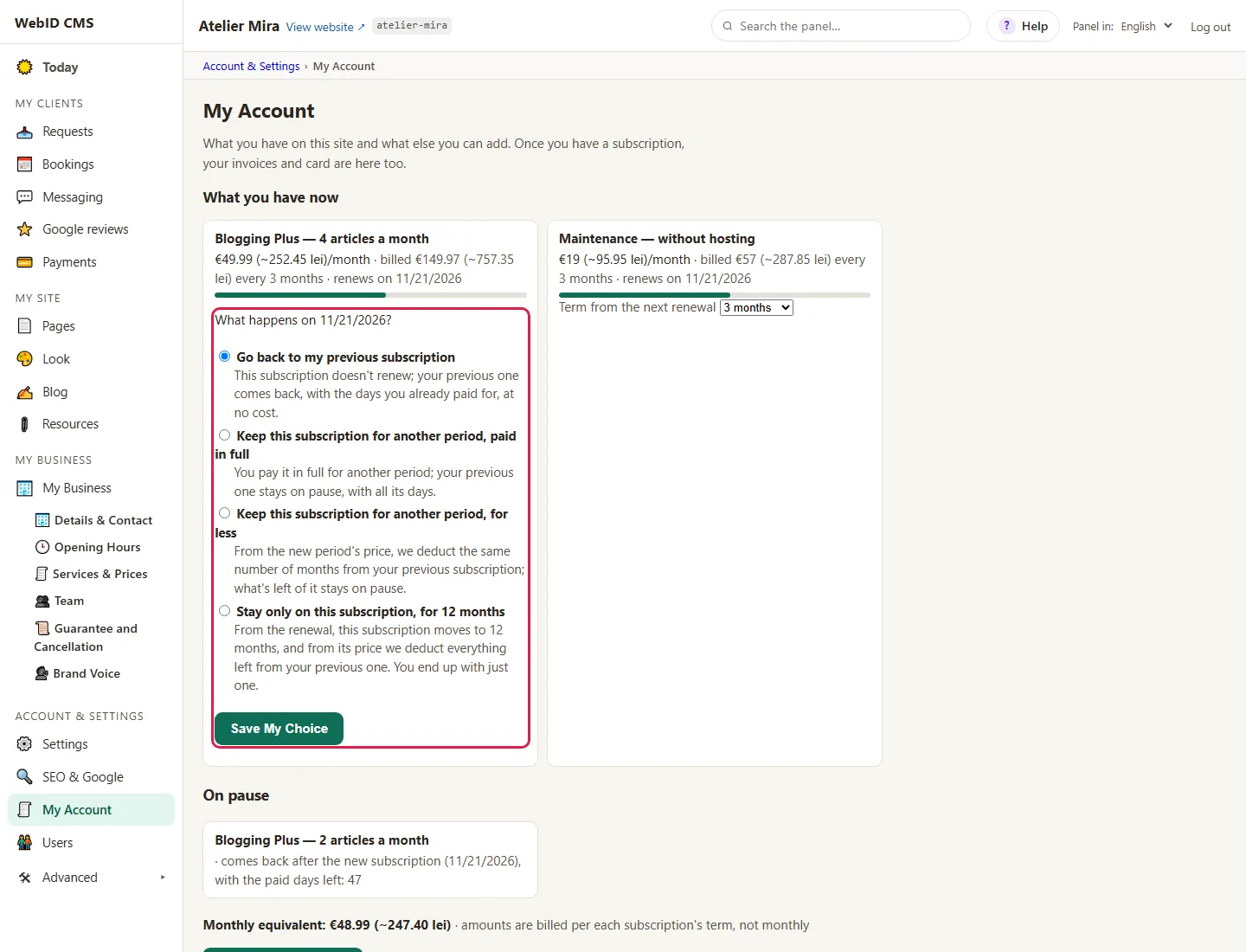
Click Save My Choice. You can change it until the subscription ends.
When you need less: switch to a smaller subscription
- In My Account, under Blogging Plus, you'll find From the renewal, switch to.
- Choose the smaller subscription. Your choice saves on its own.
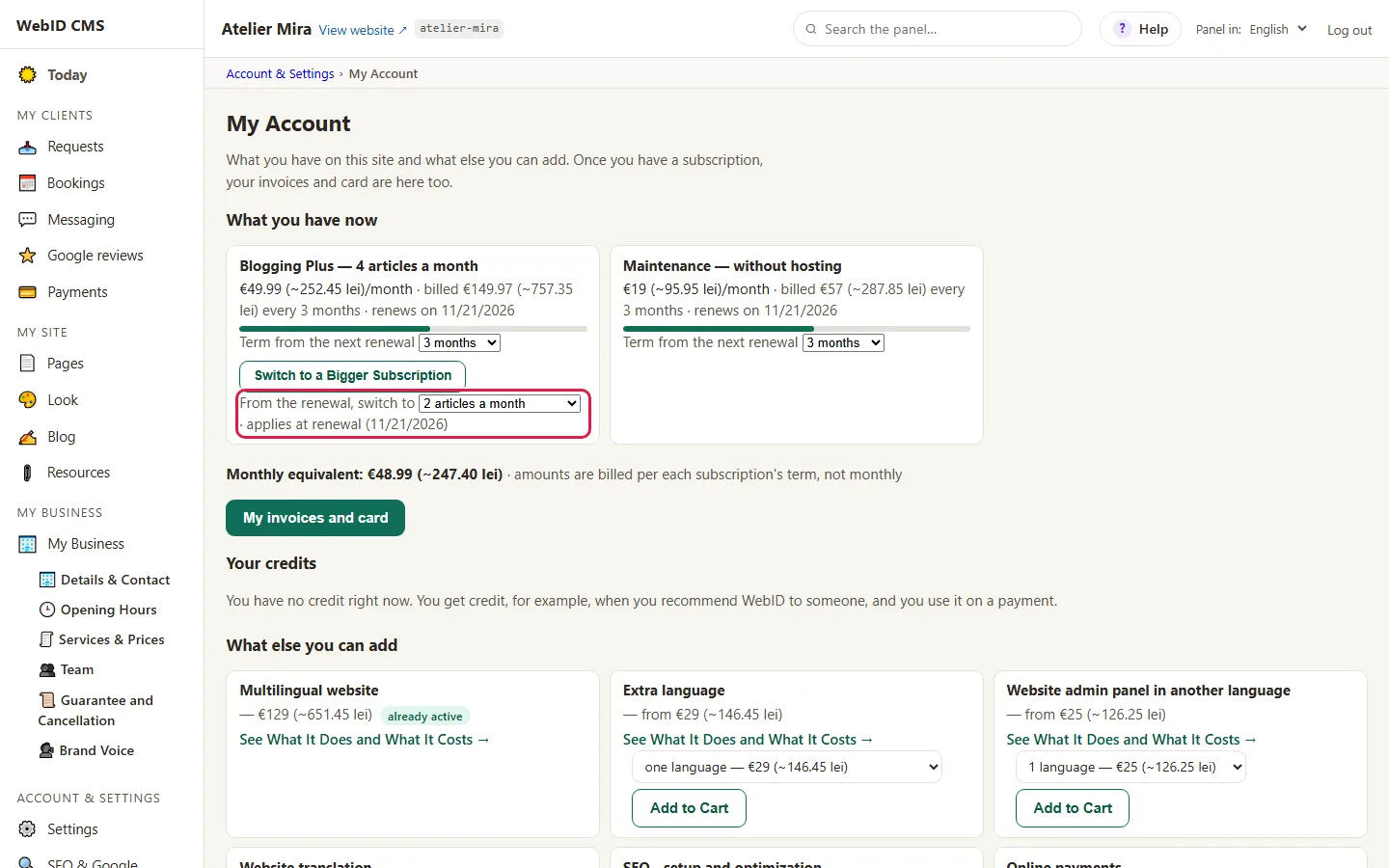
Until the renewal, nothing changes: you keep your current subscription and its credits. The smaller subscription, with its credits, starts once the renewal is paid. Changed your mind? Choose "your current subscription" again, anytime before the renewal. There's no refund for the period already paid.
What happens if you stop
How to stop a subscription is in How to change your term or cancel a subscription. With Blogging Plus, after you stop:
- Your remaining credits aren't lost: you keep using them, each until its 3-month expiry date. On the Blog page, you see how many you have and until when the oldest are valid.
- Topic ideas stop: the monthly ones no longer come and you can't request new ones.
- Published articles stay on your website, and they're yours.
- You can't get new credits anymore; while you have valid credits, you can write with them. When they run out, to write again, you restart the subscription (the Small tier: €29 for one month, 4 credits). The window in Blog shows you the restart before you pay.
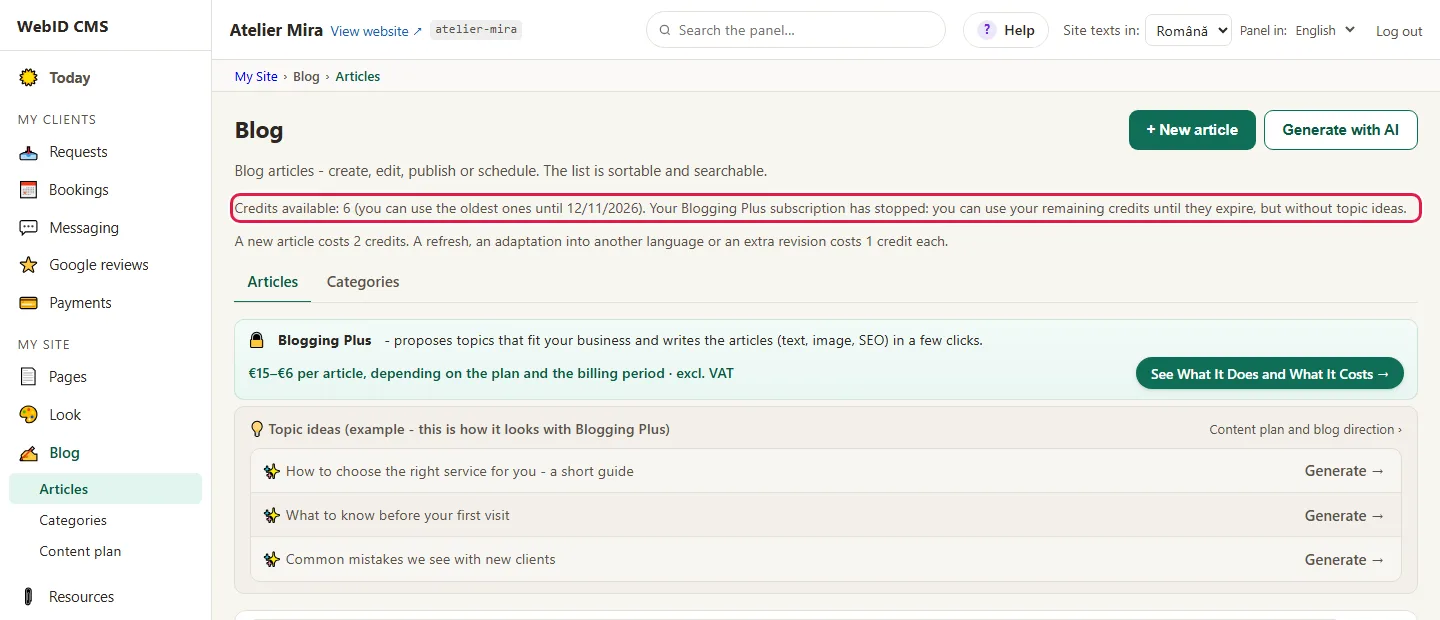
You restart the subscription anytime, from My Account › What else you can add, with Add to Cart (the steps are in How to add a new add-on to your website). Monthly credits and topic ideas come back once you pay.
An example: a guesthouse with a season
The guesthouse has the Small tier (4 credits a month, 2 articles), paid yearly. In March, it wants to write more, until summer:
- It switches to the Large tier (16 credits a month, 8 articles), paid monthly, and chooses Put it on pause. It pays for the month of the big subscription; the Small tier stays on pause, with its paid months.
- From March to June, at the end of each month, it chooses Keep this subscription for another period and gets its credits. It keeps using the unused credits from the winter, until they expire, before the new ones.
- In June, it chooses Go back to my previous subscription or chooses nothing: the big subscription stops, and the Small tier comes back on its own, with its remaining days, with no payment.
Common problems
- "I don't see Switch to a Bigger Subscription." You already have the biggest subscription, you already have one on pause (then you see "What happens on <date>?" in its place) or your account isn't an owner or administrator account.
- "I don't see From the renewal, switch to." While you have a subscription on pause, you choose from "What happens on <date>?"; the selector comes back after that.
- "The cart says the new subscription has to be bigger than the current one." You switch to a smaller one from the renewal, with From the renewal, switch to.
- "I no longer get topic ideas." The subscription has stopped. You keep using your remaining credits; topic ideas come back with the subscription.
- "I chose Go back to my previous subscription and changed my mind." Change your choice in My Account and click Save My Choice, anytime before the big subscription ends.
- "Something else isn't working." Write to us at contact@webid.ro with what you see on the screen and we'll take a look.
What it doesn't do
- You can't have two Blogging Plus subscriptions active at the same time: one stays on pause while the other runs.
- What you've paid isn't refunded: neither when you switch to a smaller tier nor when you stop.
- Credits don't last longer than the month you receive them and the following two, neither the subscription's nor the extra ones.
What data it uses
Changing the subscription and paying go through Stripe, like any payment for your website. The list of providers is in the DPA.